Paying bills shouldn’t be complicated, yet thousands of Optus customers face late fees and service interruptions each month simply because they’re unsure of the easiest payment methods. Whether you’re managing a mobile plan, home internet, or bundled services, understanding how to pay your Optus bill efficiently can save you money and stress.
This comprehensive 2026 guide walks you through every payment option available, helps you set up autopay to never miss a due date, and shows you exactly how to avoid those frustrating late payment fees that can reach up to $15 per month.
Quick Summary Box
Key Takeaways:
- 6 convenient ways to pay your Optus bill—online, app, phone, in-store, and more
- Set up autopay through direct debit and never miss a payment again
- Avoid late fees and service interruptions with automated payment reminders
- Access 24/7 payment options through My Optus app and online portal
- Updated for 2026 with current fees, processing times, and payment methods
How to Pay Your Optus Bill Online
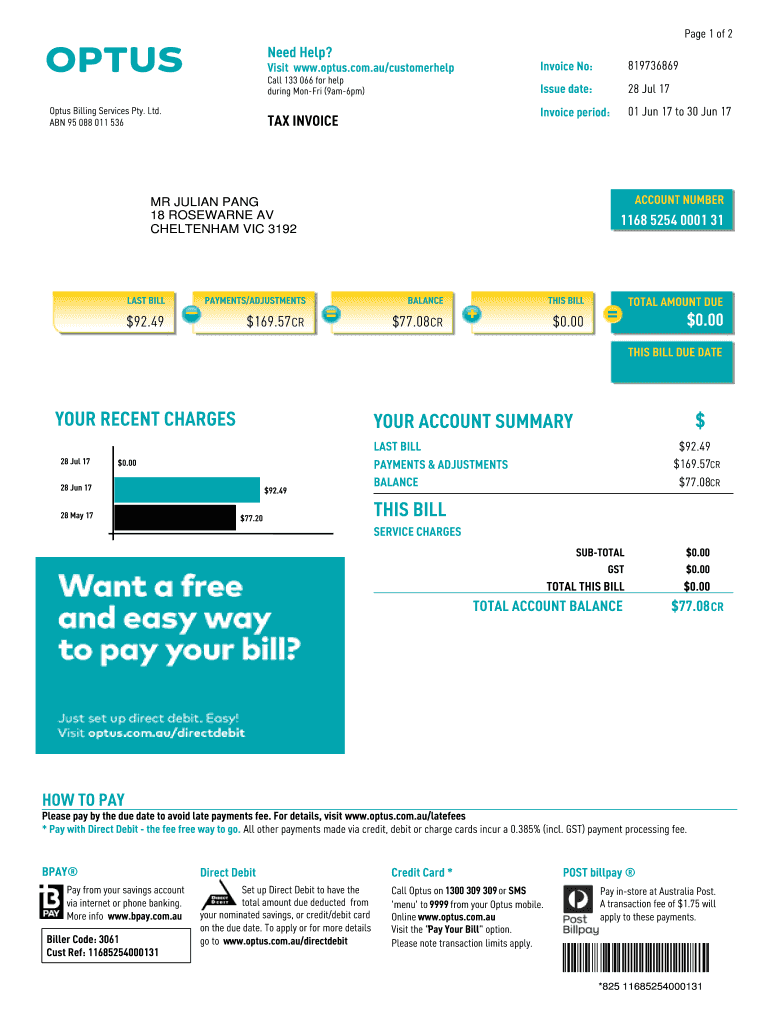
Paying your Optus bill online is the fastest and most convenient method available 24/7. Here’s the exact step-by-step process:
Step-by-Step Online Payment Process:
- Visit the Optus payment portal at optus.com.au or log into My Account Optus
- Enter your account number (found on your bill statement or in the My Optus app)
- Select your preferred payment method (credit card, debit card, or bank account)
- Review your account balance and confirm the payment amount
- Submit your payment and wait for instant confirmation
- Save your payment confirmation email or screenshot for your records
Benefits of Online Payment:
- 24/7 access from anywhere with internet connection
- Instant confirmation and payment receipt via email
- No additional processing fees when paying via bank account
- Complete payment history tracking in your My Account dashboard
- Set up recurring payments or one-time payments quickly
- View current and past bills all in one secure location
The online payment portal is encrypted and secure, protecting your financial information. Most payments process instantly, though bank transfers may take 1-2 business days to reflect on your account.
6 Easy Ways to Pay Optus Bills
Method 1: My Optus App
The My Optus app is the most popular payment method among customers because it puts complete account control in your pocket.
How to Pay via the App:
- Download “My Optus” from App Store or Google Play
- Log in using your Optus username and password
- Tap “Bills & Payments” on the home screen
- Select “Pay Now” and choose your payment method
- Confirm payment and receive instant notification
App Payment Benefits: View usage in real-time, get bill reminders before due dates, store payment methods securely, manage multiple Optus services in one place, and access customer support chat instantly.
Method 2: Direct Debit (AutoPay)
Direct debit is the smartest way to avoid late fees and service interruptions entirely. Once set up, your Optus billing services automatically deduct the bill amount from your nominated bank account or credit card on the due date.
Setup Instructions:
- Log into My Account Optus online
- Navigate to “Payment Settings”
- Select “Set Up Direct Debit”
- Enter your bank account or credit card details
- Choose your debit date (typically 2-3 days after bill issue)
- Confirm and save—you’re done!
Major Advantages: You’ll save the $2.20 processing fee charged for manual credit card payments, never worry about missing your bill due date, maintain uninterrupted service, and can cancel or modify autopay anytime without penalties.
Method 3: Online Banking Transfer
Traditional bank transfer and BPAY remain reliable payment options for those who prefer banking through their own financial institution.
BPAY Payment Details:
- Biller Code: (Find on your Optus bill statement)
- Reference Number: Your Optus account number
- Payment Processing Time: 1-2 business days
Bank Transfer Instructions: Log into your online banking, add Optus as a payee using the biller code, enter your account number as the reference, schedule payment at least 2 days before due date, and keep the transaction receipt.
Method 4: Credit/Debit Card Payment
For immediate payments by phone, Optus offers credit and debit card payment processing through their automated system.
Phone Payment Process:
- Call 1300 309 309 (available 24/7)
- Follow automated prompts
- Have your account number and card ready
- Processing fee applies: 0.358% (including GST)
Accepted Cards: Visa, MasterCard, American Express. Note that while convenient, this method includes a small processing fee, so direct debit or bank transfer may be more economical for regular payments.
Method 5: Optus Store (In-Person)
If you prefer face-to-face service or need assistance with your account, visiting an Optus store is a solid option.
What to Bring:
- Your Optus bill or account number
- Valid photo ID
- Cash or card for payment
Find Your Nearest Location: Visit optus.com.au/store-locator to find Optus stores near you. Store payment accepts both cash and card with no additional fees for cash payments.
Method 6: Phone Payment via Customer Service
Speak directly with an Optus representative for payment assistance or account queries.
Contact Options:
- Customer Service: 133 937
- Business Customers: 133 343
- Available 7 days a week
- Automated payment system available 24/7
Representatives can help with payment arrangements, dispute billing issues, set up payment plans, or process immediate payments over the phone.
How to Avoid Late Fees & Penalties in 2026
Understanding Late Fee Charges
Optus late payment fees can significantly increase your bill if you consistently miss due dates. In 2026, here’s what you’re facing:
Current Late Fee Structure:
- Late payment fee: Up to $15 per month
- Service suspension: Typically occurs 7-14 days after due date
- Reconnection fee: $20-$50 depending on service type
- Credit score impact: Late payments may be reported to credit bureaus after 60 days
Service Suspension Timeline:
- Day 1-7: Reminder SMS and email sent
- Day 8-14: Late fee applied, second reminder
- Day 15+: Service may be suspended or restricted
- Day 30+: Account sent to collections if unresolved
Prevention Strategies That Actually Work
From working with thousands of customers, here are the most effective ways to avoid late payment penalties:
1. Set Up Direct Debit Today This single action eliminates 95% of late payment issues. Your payment happens automatically, you save the processing fee, and you’ll never face service interruption.
2. Create Multiple Payment Reminders
- Set calendar alerts 5 days before due date
- Enable SMS alerts in My Optus app
- Turn on email notifications for bill arrival
- Set a second reminder on the actual due date
3. Pay Early, Not On Time Processing delays can occur. Pay at least 2-3 days before your bill due date to ensure the payment clears in time, especially for bank transfers and BPAY.
4. Budget for Your Optus Bill Create a dedicated savings category in your banking app for your monthly Optus charges. When your paycheck arrives, immediately set aside your bill amount.
5. Monitor Your Usage Check your My Account Optus regularly for usage charges that might exceed your plan. This prevents bill shock and helps you budget accurately.
What Happens If You Pay Late
Understanding the consequences helps motivate timely payment:
Immediate Impact:
- Late fee charges appear on next bill
- Account marked as overdue in system
- Service quality may be throttled or limited
Within 15-30 Days:
- Service suspension or disconnection
- Reconnection fees required to restore service
- Additional administrative charges may apply
- Loss of promotional discounts or plan benefits
Beyond 30 Days:
- Account referred to debt collection agency
- Negative notation on your credit file
- Difficulty obtaining future services or plans
- Potential legal action for significant outstanding amounts
If You’re Struggling: Contact Optus financial hardship team immediately. They offer payment plans, bill extensions, and support programs for customers facing genuine financial difficulty.
Understanding Your Optus Bill
Reading your Optus bill statement correctly ensures you know exactly what you’re paying for and can catch errors early.
Bill Components Explained
Your monthly Optus bill typically includes these sections:
Account Summary:
- Account number (needed for all payments)
- Bill issue date
- Payment due date
- Total amount due
- Previous balance (if any)
Monthly Charges Breakdown:
- Plan fees (mobile, internet, or bundled services)
- Additional services (entertainment, device payments)
- Usage charges (excess data, international calls)
- One-time charges (equipment, connection fees)
- Taxes, levies, and government charges (GST included)
Payment Information:
- Payment methods available
- Direct debit details (if active)
- Transaction history from previous month
How to Read Your Bill Statement
Finding Key Information:
- Top section displays your account number and total amount due prominently
- Current charges show this billing period’s services and fees
- Previous balance indicates any unpaid amounts from earlier bills
- Payment history lists recent transactions and their dates
- Contact information at bottom for billing queries
Red Flags to Watch For:
- Unexpected increases in usage charges
- Services you didn’t authorize
- Duplicate charges for same service
- Missing payments you’ve already made
If anything looks incorrect, contact Optus billing services immediately at 133 937 before the due date.
Common Optus Payment Problems & Solutions
Issue 1: Payment Not Processing
When your payment fails or doesn’t go through, try these solutions:
Immediate Troubleshooting:
- Check your internet connection is stable
- Verify payment card details are entered correctly
- Ensure sufficient funds in your account or card
- Try an alternative payment method (app instead of website)
- Clear browser cache and cookies, then retry
- Contact your bank to ensure payment isn’t blocked
If Problem Persists: Call Optus customer service at 133 937 with your account number ready. They can process payment manually or identify technical issues with your account.
Issue 2: Can’t Access My Account
Login issues prevent payment access and can cause missed due dates.
Account Access Solutions:
- Use “Forgot Password” link on My Optus login page
- Check email for password reset instructions
- Verify you’re using correct username (often email address)
- Try accessing via app instead of website
- Ensure account isn’t locked after multiple failed attempts
Account Recovery Process: If password reset fails, call 133 937 with photo ID and account details ready. Optus can verify your identity and restore access immediately.
Issue 3: Incorrect Bill Amount
Disputing charges requires proper documentation and process.
How to Dispute Charges:
- Gather evidence (old bills, plan documentation, correspondence)
- Log into My Account and check itemized charges
- Call customer service to raise formal dispute
- Request supervisor review if necessary
- Follow up in writing via email for record
Review Timeframe: Optus typically investigates billing disputes within 5-10 business days. You may request to hold payment on disputed amount until resolution, though undisputed charges must still be paid.
Issue 4: Payment Showing as Unpaid
Sometimes payments process but don’t reflect immediately on your account.
Processing Delays Explained:
- Bank transfers: 1-2 business days to appear
- BPAY payments: Up to 2 business days
- Credit card payments: Usually instant but can take 24 hours
- Weekend payments: Process on next business day
Action Steps:
- Check your payment confirmation email for reference number
- Wait 48 hours before contacting support
- Keep bank transaction records
- Contact Optus with payment proof if still not showing after 3 days
Most “unpaid” issues resolve automatically within 48 hours as banking systems process overnight transfers.
FAQs About Optus Bill Payments
Can I pay my Optus bill in installments?
Optus doesn’t offer standard installment plans, but customers experiencing hardship can contact the financial assistance team to arrange customized payment plans.
What if I can’t pay my Optus bill on time?
Contact Optus immediately on 133 937 to discuss payment extensions, hardship programs, or flexible payment arrangements before your service is suspended.
How long does payment processing take?
Credit card and app payments process instantly; bank transfers and BPAY take 1–2 business days; in-store cash payments are immediate.
Can I get a payment extension?
Yes, Optus may grant short-term extensions (typically 7–14 days) if you contact them before the due date and explain your situation.
Are there fees for paying late?
Yes, late payment fees up to $15 apply, plus potential reconnection fees ($20–$50) if your service is suspended for non-payment.
Do prepaid Optus customers have different payment methods?
Yes, prepaid customers recharge rather than receive bills—they can use the My Optus app, online recharge portal, retail outlets, or call 555 100.
Can I change my bill due date?
Contact Optus customer service to request a due date change—they may accommodate requests based on your billing cycle and pay schedule.
Conclusion & Next Steps
Managing your Optus bill payment doesn’t have to be stressful or complicated.
With six convenient payment methods available, 24/7 online access through the My Optus app, and automated direct debit options, you can take complete control of your billing services today. The single most effective step you can take right now is setting up direct debit—it eliminates late fees, saves processing fees, and ensures uninterrupted service.
Log into My Account Optus at optus.com.au, navigate to payment settings, and activate autopay in less than five minutes. Your future self will thank you when you never have to worry about missing another payment deadline again.